How to Reduce Stock and Stockouts with KanbanBOX
Pull-Based Replenishment, Lower Inventory, Zero Stockouts
Stockouts are one of the most feared situations in production. In the worst-case scenarios, just one missing component can halt a production line, create cascading delays, generate tension between departments, and compromise on-time delivery to customers.
To avoid this situation, many companies increase safety stock. This is certainly a cautious approach but creates other problems: saturated warehouses, immobilized capital, obsolete materials, management difficulties, hidden errors under piles and piles of materials and components.
The real goal is not to choose between “too much stock” and “risk of stockouts,” but to find the right balance.
This is exactly where KanbanBOX comes in: the pull-based material management software that enables companies to avoid stockouts while also reducing stock levels. Let’s see how.
Visibility and Statistics on Actual Inventory Levels
One of the main causes of excess inventory is a lack of visibility: when data is not fully reliable because it is collected manually and recorded on endless Excel sheets or based on rough estimates, companies tend to overorder “just in case.”
KanbanBOX automatically records all consumption data from the system and turns it into objective and usable information.
Specifically, KanbanBOX allows you to:
- Control inventory levels in real time
With just a few clicks, you can access the updated status of stock through the digital board. Colors and icons allow you to immediately understand which and how many components are available, in production, in transit, or in accumulation. No parallel Excel sheets are needed, nor manual checks: the system provides a clear and shared snapshot of the situation.[We’ve gone deeper into how KanbanBOX addresses visibility issues in this article] - Obtain reports and statistics
Through the Kanban BI module of KanbanBOX or through integrable external Business Intelligence software like Power BI, you can access detailed statistics and reports to identify oversized materials, abnormal accumulations, or inefficiencies in the replenishment process.
This allows you to take progressive and targeted action, reducing stock where there is real room for improvement, without ever compromising service levels.
Additionally, for each material, you can indicate the exact pickup and/or delivery location. This allows operators to easily find the necessary material, avoiding situations where a material, lost among long rows of shelves and boxes, is reordered just because it can’t be found.
“Thanks to KanbanBOX, we can now monitor inventory levels in real time, always know the exact location of every material, and access data that helps us better understand our stock levels, enabling us to reduce them across the entire facility.”
Patricia Okraski, Lean Business Systems Manager at Gilbarco Veeder-Root (now Vontier Group)
[Go to the case study of Gilbarco Veeder-Root (now Vontier Group)]
Data Traceability and Automatic Kanban Sizing Calculation
A kanban system works well only if it is sized correctly. But to size it properly, you need to know the actual consumption.
KanbanBOX records when a material is depleted and how long it takes to be replenished, creating a reliable history.
This information is used by the software to automatically calculate the optimal kanban sizing, which the decision-maker, such as the Production Manager or Lean Manager, can confirm or modify based on any other factors.
The result is a kanban system with sizing always aligned with real operational needs, with enough stock to maintain production continuity without burdening the warehouse.
“Thanks to the automatic calculation of the optimal kanban sizing, today the Oscar Lambret Care Center is able to easily manage the continuous and rapid changes in the consumption of prescribed drugs for patients.
Therapies can change significantly from one day to the next, but the system dynamically adapts to the new consumption levels, avoiding uncontrolled increases in stock. This is a critical aspect when dealing with medicines with very strict expiration dates.”
Francesco Dall’Oca, Founding Partner of KanbanBOX on the Oscar Lambret Care Center
Real-Time Order Transmission
In traditional kanban systems (i.e., non-electronic), the actual time between consuming a material and sending the replenishment order can vary significantly.
This mainly happens for two reasons:
- Manual order management takes time and introduces various operational steps
It requires physically going to production, collecting the kanban cards from different areas, transcribing the information, filling out order emails, checking minimum purchase requirements or agreements with suppliers, sending supplementary requests for missing data, and chasing confirmations.
These are non-value-adding activities that consume time and increase the risk of errors. - Order transmission is not continuous but occurs according to a schedule established by the company (once or more per day, sometimes even less).
This means that if a kanban card is delivered even just one minute after collection, its reorder will be pushed to the next cycle. And if this happens before the weekend or during the supplier’s closure period, the delay increases even further.
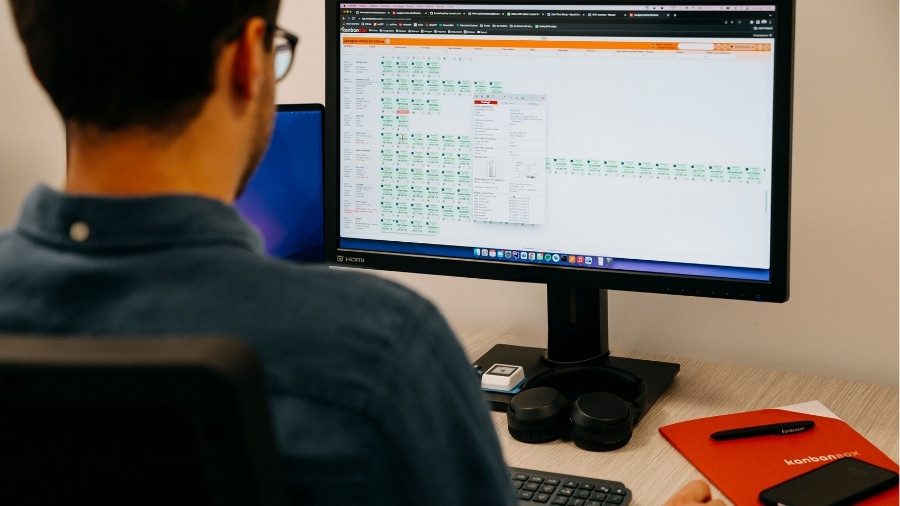
With KanbanBOX, the replenishment order transmission is digitized and real-time: the consumption of the kanban card automatically generates the order request (immediately or when the agreed-upon number of batching cards is reached), eliminating unnecessary waits and most manual activities, including emails and follow-up calls.
Another point not to overlook is that by reducing the time between consumption and order transmission, the stock required to cover lead time is automatically reduced. It’s a direct relationship: the faster the information flow, the less inventory is needed to ensure production continuity.
“The operation of retrieving kanban cards from the warehouse used to be done twice a day. However, just one urgent card being delivered a few minutes after collection could delay its reorder, compromising operational continuity. With KanbanBOX, we’ve solved this and other problems.”
Michael Mularoni, Kaizen Trainer at Robopac
Integration and Transparency with Suppliers
Another key element in reducing stockouts is collaboration with suppliers.
Through the shared board, the supplier can see the status of their assigned stock and monitor the batching kanban cards. When the agreed threshold is reached, they know it’s time to act according to prior agreements about product codes, quantities, lead times, etc.
No more waiting for emails or phone calls to get confirmations. The information is complete, updated, and shared in real-time, without constant back-and-forth to fill in missing data and without delays due to manual steps or fragmented communications.
This transparency reduces urgency, stabilizes the flow, and decreases the need to maintain high safety stock levels.
“By adopting KanbanBOX to manage orders with suppliers, we have easily achieved our goals: reducing stock with an average percentage reduction of 50% in stock levels and eliminating stockouts, which used to be a recurring issue.”
Ing. Pier Antonio Foscan, Kaizen Promotion Officer at Ideagroup
Sharing Forecasted Consumption Data
To meet the needs of production environments with highly variable demand, KanbanBOX offers the ability to integrate forecasted consumption data with its kanban system via the Forecast module.
The Forecast module has two functions:
- Calculate the optimal kanban sizing based on forecasted data, to compare with the sizing calculated based on historical consumption data.
- Easily share forecasted data with suppliers, who can see in advance the expected consumption changes and confirm their production capacity with a click. If possible issues arise, interventions can take place before they turn into stockouts.
We discussed the benefits of the Forecast module and how it integrates forecast data into your Kanban system without altering its pull logic in this article.
Reducing WIP Stock in Production
When it comes to reducing stock, people often think immediately of the finished goods warehouse or external suppliers. But an often more critical part is inside the factory: WIP (Work In Progress), i.e., materials and components for which production has already started but is not yet completed.
Semi-finished products stuck between stages, carts full “waiting,” batches launched too early out of fear of running out of materials downstream. This type of stock is less visible, but just as costly: it occupies space, absorbs capital, increases lead times, and hides process problems, making it harder to identify where bottlenecks occur.
With KanbanBOX:
- Gain full control and maximum visibility over production activities, even in cases of multi-stage operations (multiprocess kanban) or multi-site production.
- Easily identify processes causing bottlenecks and immediately understand their impact on downstream lead times.
- Identify potential issues to intervene promptly.
- Manage work priorities flexibly across different production cells with the Sequencer
- Level the flow with Heijunka.
The result is a production system that is fully under control, smoother, and with less hidden WIP. Therefore, reducing stock doesn’t just mean lightening the warehouse: it means making the entire production process leaner, more reactive, and more manageable.
“Thanks to KanbanBOX, we have not only effectively reduced both countered stockouts and warehouse value, but also WIP of some semi-finished products by 48%, while increasing the kanban material turnover index from 3.5 to 6.6.”
Stefano Pedon, Supply Chain Manager at Orotig
Continuous Improvement and New Operational Choices
In addition to data analysis for identifying improvement margins, KanbanBOX provides operational tools that open up possibilities previously difficult to imagine. It’s not just about better controlling the warehouse, but about rethinking the production model.
When you have real-time visibility, synchronized flows, and suppliers integrated into the system, it becomes possible to drastically reduce stock levels to the point of evaluating a shift from a Make to Stock system to Make to Order, producing on actual demand rather than forecasts.
This is exactly what happened at Oleodinamica Marchesini: as processes were optimized and the software’s functionality deepened, new improvement opportunities emerged that progressively expanded the initial project.
The result was not just a lighter warehouse, but a more responsive production system, more aligned with demand, and less dependent on preventive stock.
“For our highest-rotating article, I thought it was inevitable to keep at least 200 boxes in stock. With KanbanBOX, we went well below: first to 93, then to 14, and soon we’ll only have 2 boxes. We’re producing the same amount as before, but the other hundreds of boxes are now shipped to customers as soon as assembled, completely eliminating the storage phase.”
Dino Falciola, CEO, Oleodinamica Marchesini
KanbanBOX: The Right Ally for Reducing Stock and Stockouts
As highlighted by the testimonials shared, it is indeed possible to effectively and sustainably reduce both stock levels and the risk of stockouts.
The credit goes to a system that combines visibility, historical data, objective calculations, supplier collaboration, and information speed.
If you’re looking for a tool to permanently solve excess stock and frequent stockouts, KanbanBOX is the right choice for you.
Contact us today for a free, no-obligation call: our experts are ready to listen to your needs!