From Linked Customer to Active Supply Chain Manager
A supplier invited you to use KanbanBOX, and today you manage orders, information, and communications with them through the platform.
You have probably already noticed the difference compared with a traditional approach: fewer emails and phone calls, easier access to information, traceable orders, and smoother collaboration. As many customers report: “I can almost forget about the orders managed through KanbanBOX”: once agreements with suppliers are defined, the replenishment process runs almost automatically.
But what happens with all your other suppliers?
Often, each supplier relationship follows its own rules: one order is sent by email, another through Excel, and another through a dedicated portal. For some materials, inventory needs to be checked manually in the warehouse or at the line side; for others, purchase requests or follow-ups need to be sent.
The result is a fragmented process that requires time and attention.
With a KanbanBOX owned license, you can build on the experience you already know and turn it into a common method for progressively managing more suppliers and replenishment flows.
From Platform Guest to Manager of Your Own Flows
If you currently access KanbanBOX because you were invited by a supplier, you are using a linked license. This is a free license that allows you to view the kanban loops created by the company that invited you and perform the activities allowed within those flows.
With an owned license, on the other hand, KanbanBOX becomes a tool owned by your company: you can create new kanban loops, connect suppliers, customers, and subcontractors, and also digitalize internal production and material movement processes.
The difference, therefore, is not simply the number of partners involved.
- With a linked license, you use a process configured by another company.
- With an owned license, you decide how to build, configure, and expand the system.
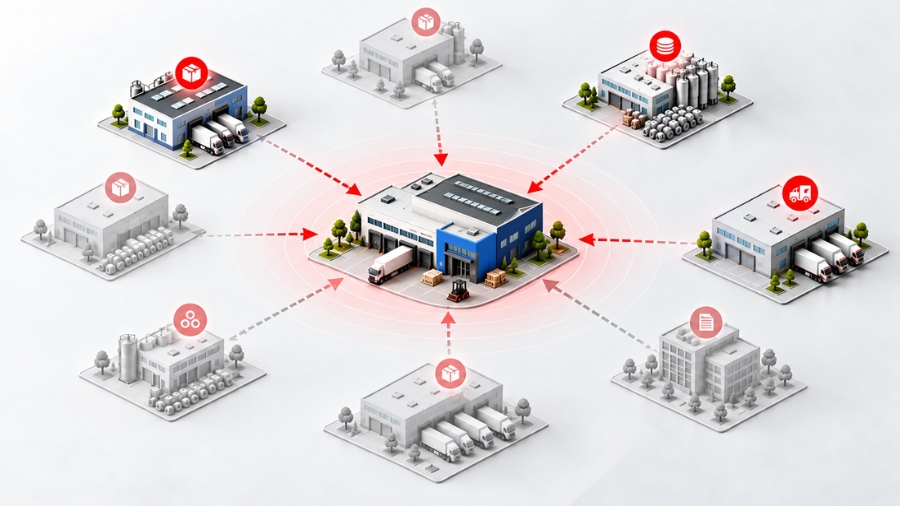
Connecting Different Stages and Players in Your Supply Chain with an Owned License
With an owned license, KanbanBOX does more than allow you to connect multiple suppliers. You can also create multi-stage flows that automatically coordinate different companies within the same supply chain.
Multi-Party Replenishment
Imagine, for example, that Mechanical Components Inc. produces a component for you that, before delivery, must be packaged using branded boxes supplied by Packaging Inc.
When a new request is generated for that product, KanbanBOX can automatically trigger two coordinated orders at the same time:
- One to Mechanical Components Inc. to start production
- And another to Packaging Inc. to send the packaging material directly to the supplier.
This way, each player automatically receives the right request at the right time, without your purchasing team having to manually coordinate the different steps.
Multi-Stage Production Flow
The same principle can be applied to multi-stage processing.
For example, Steel Inc. produces a raw component that must then be sent to Heat Treatment Inc. for further processing before being delivered to your company.
KanbanBOX can digitally connect the different stages (supplier → subcontractor → you) by synchronizing orders, progress updates, and material movements among the different parties.
In this way, “managing your supply chain” does not simply mean having multiple suppliers in the same software. It means orchestrating the entire flow across different companies and processing stages, reducing manual coordination, waiting times, and possible misalignments throughout the process.
What Is the Practical Difference Between a Linked License and an Owned License?
| What you can do | Linked license | Owned license |
|---|---|---|
| Use KanbanBOX to view your inventory status | Only for materials supplied by the linked supplier | For all materials you manage through KanbanBOX |
| Use KanbanBOX to view order status with suppliers | Only for the loops owned by the supplier that invited you | For all suppliers, subcontractors, and customers you connect to the platform |
| Independently connect new suppliers, customers, subcontractors, and partners | No | Yes |
| Create multi-stage flows involving one or more suppliers and/or subcontractors | No | Yes |
| Modify the parameters of a kanban loop | Only the “internal customer” and “customer location” parameters of loops you participate in | All parameters of the loops you own |
| Set a kanban loop limit, for example for an item code change | No | Yes |
| Perform kanban maintenance by adding or removing cards | No, only the supplier that owns the loop can do this | For all loops you own |
| Manage all kanban card statuses | Only Released and Available | Also In Process, Produced, and Shipped |
| Standard operations: view cards, add comments and notes, create and print worklists, add material expiration dates | Only in loops you participate in | In all loops you participate in or own |
| Create new kanban loops in KanbanBOX | No, not even with the supplier that invited you | Yes, with other suppliers, subcontractors, customers, and for your own internal production and material movement processes |
| Modify kanban card templates | No, not even for loops you participate in | Yes, for all loops you own |
| Access reports and statistics, including consumption reports, partner statistics, kanban loop statistics, comment history, declarations, and scan logs | Only for loops you participate in, plus scan logs for scans performed within your license | For all loops you participate in or own |
Why Use KanbanBOX with Your Other Suppliers Too?
Reduce Fragmentation in Your Purchasing Department
Managing ten suppliers in ten different ways means constantly switching tools, searching for information, and remembering different procedures.
Even when emails, Excel files, and phone calls do not have a direct cost, the time required to manage them represents a real cost.
Bringing more suppliers into KanbanBOX allows you to create a standardized way of working: the same platform, the same operating logic, and information organized in the same way.
The result is less day-to-day complexity and fewer administrative activities.
Automate Replenishment Requests and Reduce Non-Value-Added Activities
With KanbanBOX, once the agreed minimum order quantity is reached, the order request is generated and automatically sent to the supplier directly through the system.
This eliminates the need to manually check warehouse inventory, collect requests from departments, verify quantities and agreements, and then manually enter and send orders by email or through dedicated supplier portals.
This helps reduce the time spent on repetitive activities and allows the purchasing team to focus on exceptions and truly value-added work.
Centralize Orders and Communications on the Same Platform
When a supply flow is managed across emails, phone calls, and different files, reconstructing what happened can become difficult.
In KanbanBOX, orders, kanban cards, comments, notes, and flow-related information remain contextualized and traceable.
This makes both daily operations and problem management easier because customers and suppliers are always working with the same information.
Increase Visibility into Your Replenishment Processes
With KanbanBOX, you gain greater visibility into the status of materials, orders, and activities related to your supplies, reducing the need to constantly contact suppliers for updates.
It is therefore not just about digitalizing the order itself, but about making the entire replenishment process more visible, controllable, and traceable.
Your Suppliers Benefit Too
Bringing another supplier into KanbanBOX does not simply mean asking them to adapt to a new tool: the benefits are shared.
Suppliers can also benefit from:
- Clearer, more standardized, and more structured orders and requests
- Fewer emails and phone calls
- Information and communications linked directly to the correct material or order
- Greater visibility into customer requests
- Fewer administrative activities related to order management
- More stable collaboration based on transparency and mutual benefit
In practice, instead of asking the supplier to constantly check whether new orders or clarifications have arrived, both companies work within the same digital process.
A Practical Example: Orotig, from Linked Customer to Manager of Its Own Supply Network

Orotig, a company specialized in laser technologies, first discovered the platform because one of its suppliers was already using KanbanBOX and invited Orotig as a linked customer.
The company was therefore able to test KanbanBOX initially within a single supplier relationship and directly experience the benefits of digital kanban management.
That experience led to a simple question: why not apply the same method to other replenishment flows?
Orotig then activated an owned license and began to progressively extend KanbanBOX across its supplier network and internal processes.
Today, its digital replenishment system includes 38 suppliers and more than 800 kanban loops.
Along the way, the company achieved an 88% reduction in stockouts, a 7.5% reduction in raw material inventory value over one year, and an increase in inventory turnover for materials managed through e-kanban from 3.5 to 6.6.
The Orotig case shows that a linked license can be much more than simple free access to the platform: it can become the starting point for testing a method and, once the benefits have been proven, extending it across your own supply chain.
How to Upgrade to an Owned License
If you want to understand how you could use KanbanBOX with your other suppliers as well, fill out the form below.
One of our specialists will review how you currently manage replenishment, which flows would make the most sense to digitalize first, and whether an owned license is the right solution for your company.
You will then receive a customized quote based on the flows you want to manage.
The subscription cost does not depend on the number of partners you connect: you can connect one supplier or one hundred without that alone affecting the subscription fee. Pricing instead depends on the number of kanban loops managed in KanbanBOX.
In addition, the subscription is monthly. This means you can start without a large upfront investment, gradually expand the system based on the results you achieve, and avoid being locked into long-term contracts.
Fill out the form and find out which supplier or flow could be the best place to start.