Analize KanbanBOX’s data: Kanban BI vs. Power BI
A comparison to understand when to use each Business Intelligence tool
When evaluating electronic kanban software, data analysis capability is often an underestimated but crucial factor.
Digitalizing processes is valuable, but it truly makes a difference only if the system allows you to read, interpret, and use the collected data to improve performance.
A good software solution should therefore offer clear, real-time, and easily accessible analysis tools capable of turning operational data into actionable insights.
Considering this aspect when choosing an electronic kanban software means selecting not just a management platform, but a true decision-support tool that drives continuous improvement.
KanbanBOX’s advanced Data Analysis options
In addition to reporting and viewing historical data on numerous parameters, such as consumption, average supplier lead time, status changes, scans, and more, KanbanBOX provides even more advanced data analysis tools.
Companies can choose between two options:
- The Kanban Business Intelligence (Kanban BI) module, natively integrated into the platform for immediate, real-time analysis.
- Integration with external Business Intelligence tools, such as Power BI, ideal for those who want to combine kanban data with information from other business systems.
Both solutions turn data into valuable insights, but they address different needs. Let’s see when it makes sense to choose one over the other.
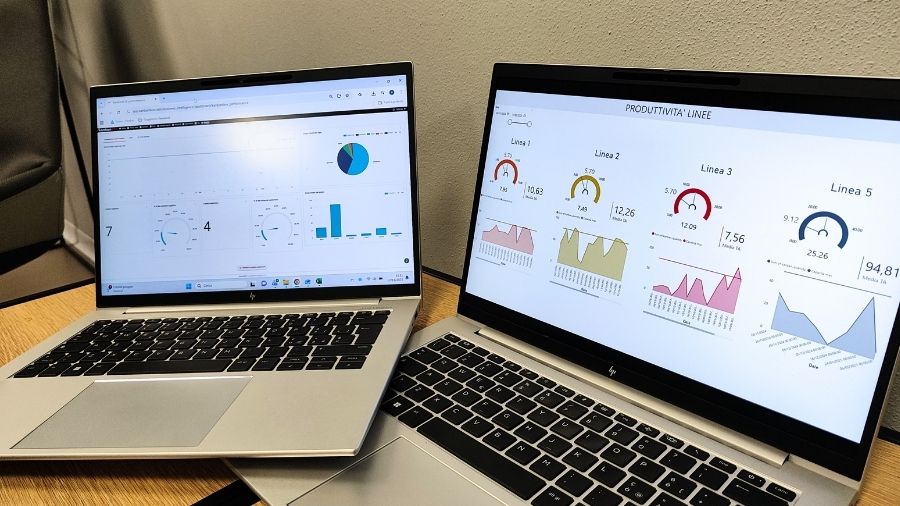
Kanban BI: everything in KanbanBOX, ready to use
Kanban Business Intelligence is KanbanBOX’s native functionality, designed for those who want to analyze kanban data directly within the platform without having to configure external software.
Dashboards are preconfigured, updated in real time, and designed to meet the needs of production and supply chain professionals.
With Kanban BI, you can:
- Monitor key KPIs such as stock levels, supplier punctuality, stockouts, and kanban maintenance.
- Analyze operational data day by day, with constantly updated indicators.
- Work simply and intuitively, with no technical skills or BI configuration required.
In short, KanbanBI is the ideal solution for those seeking speed, integration, and simplicity, with consistent and ready-to-analyze data.
Power BI: for cross-system and multi-level analysis
The integration between KanbanBOX and Power BI is the right choice for those who want to aggregate and compare data from multiple business systems, such as ERP, MES, or CRM.
Power BI allows you to build fully customized dashboards and combine kanban data with financial, production, or commercial data.
It’s the ideal solution if:
- You have an internal team with Business Intelligence expertise.
- You want to independently develop customizable dashboards and reports.
- You need to cross-analyze data from different company sources.
This means, Power BI offers maximum flexibility and advanced analytics across heterogeneous data sources but requires variable setup times.
The duration of implementation depends on several factors: the complexity of the project, the number of external systems to integrate, and the level of expertise of the internal team managing the configuration.
KanbanBI e PowerBI: comparative table
| Feature | Kanban Business Intelligence (Kanban BI) | Integration with external platforms (e.g., Power BI) |
|---|---|---|
| Tool Type | Native KanbanBOX module | External Business Intelligence tool |
| Installation / Configuration | None required, already integrated in KanbanBOX | Requires setup and connection to KanbanBOX |
| Data Update | Real-time and automatic | Based on the schedule set in Power BI or manual updates |
| Data Source | KanbanBOX data only | KanbanBOX + other sources (ERP, MES, CRM, etc.) |
| Available Dashboards | Preconfigured and ready to use (1 free + 6 premium) + custom dashboards | Built from scratch, with standard packages or custom setups |
| Complexity Level | Low: ready to use | Medium-high for configuration (requires BI skills), low once configured |
| Customization | On request, through dedicated development | On request through custom development, or managed autonomously by the user or BI team (if skilled) |
| Main Purpose | Analyze operational KPIs from the kanban system | Combine kanban data with other business systems for cross-analysis |
| Ideal User | Production, supply chain, or Lean manager | IT teams, data analysts, or management |
| Setup Time | Immediate | Variable, depending on the integration |
| Key Benefit | Simplicity, speed, and real-time data | Flexibility and cross-functional, multi-system analysis |
Getting started with Business Intelligence
If your company already plans to integrate data from other systems (such as ERP, MES, or CRM), or already uses external analysis tools like Power BI, the most natural choice is to continue using those tools by simply requesting integration with KanbanBOX.
This way, you can centralize all business data in a single analytical environment, maintaining consistency and continuity with your existing systems.
Otherwise, we recommend starting with Kanban Business Intelligence (Kanban BI).
Here’s why:
- It requires no initial investment to set up integration between systems.
- It has no startup time: once activated, it’s immediately operational.
- You can activate it yourself in just a few clicks: if you already have a KanbanBOX license, simply go to Reports > Business Intelligence > Activate Kanban BI.
- It’s available as a monthly add-on to your KanbanBOX license: you can activate it, test it for as long as you like, and if it doesn’t meet your needs, deactivate it anytime, with no cancellation fees.
Two solutions, one goal: better decisions
Whether you choose Kanban BI or external tools like Power BI, the goal is the same: to make data your daily ally in improving processes, reducing waste, and supporting fact-based strategic decisions.
If you want a ready-to-use, integrated system, Kanban BI is the natural choice.
If you prefer a broader and more customized vision, combining KanbanBOX data with information from other business systems, Power BI is the best fit.