Multiprocess Kanban: what it is and how it works
When people talk about kanban, they often imagine a simple, linear flow: a downstream process consumes a material, generates a card, and an upstream process produces or supplies what is needed to replenish that consumption.
In real manufacturing environments, however, production flows are often made up of multiple stages, carried out in different departments and involving intermediate operations that require coordination, synchronization, and constant visibility.
This is exactly where multiprocess kanban comes into play: it’s one of the most appreciated features of KanbanBOX, designed to manage multi-stage production flows in a lean and automated way, while preserving the pull principle: each activity starts only when needed, and only in the required quantity.
What is multiprocess kanban?
Multiprocess kanban is a KanbanBOX feature that enables the management of processes composed of multiple stages.
Instead of having a single card triggering the final production, the system generates a sequence of cards, one for each level of the list of materials or for each processing phase, ensuring that every upstream process is pulled in a coordinated way by the downstream process.
In practice, when an order (kanban or closed order) for a finished product is received, KanbanBOX:
- Automatically creates the cards required for each phase of the flow, from semi-finished items to raw components
- Activates them in sequence, starting each process only when the downstream phase actually needs it
- Coordinates the entire production flow, ensuring materials, timing, and resources are perfectly synchronized
The result is a pulled, orderly production process with no unnecessary intermediate inventory.
Let’s look at the three main use cases.
Multiprocess kanban for orders with multiple processing stages (multi-stage production)
In this use case, we are dealing with items (semi-finished or finished products, managed via kanban or closed orders) that must pass through multiple sequential processing stages.
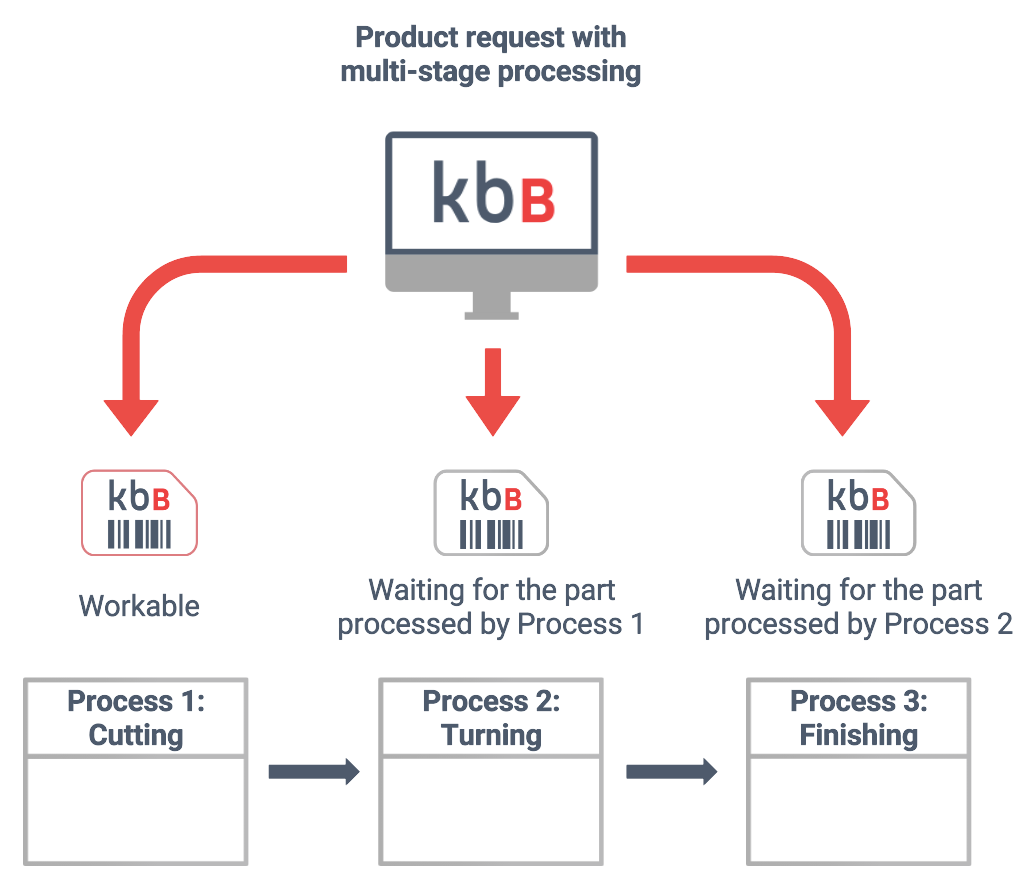
Let’s imagine a company that produces metal pipes requiring three sequential operations: cutting, turning, and finishing.
When KanbanBOX receives the order (or replenishment) request for a specific pipe, the software generates one kanban card for each production phase (cutting, turning, finishing), linking them together in a logical sequence.
In this way:
- The software creates cards for all processing stages. The card for the first stage (cutting) is immediately workable.
- The cards related to subsequent stages (turning and finishing) are set to “Waiting” status: they cannot be worked yet because the part from the previous phase is not available.
- When the first-stage card (cutting) is completed and the part becomes available for the second stage (turning), the related card automatically moves from “Waiting” to “Ready” and becomes workable in the workload of the appropriate cell.
- The same logic applies to the following stage (finishing), until the part has passed through all sequential operations and the requested item (the pipe) is ready.
It is important to note that in multiprocess workflows, not only production kanban may be involved, but also move kanban, which are essential to correctly synchronize every phase of the flow.
In this way, the flow not only follows pull logic from a production standpoint, but also maintains logistical consistency, ensuring that every movement happens only when needed, without unnecessary anticipation or intermediate accumulation.
The result is a fully synchronized process flow in which production and logistics operate as a single integrated system: each phase receives exactly what it needs, when it needs it, and in the required quantity.
Multiprocess with suppliers and subcontractors
Similarly to the previous use case, multiprocess kanban can also be applied when part of the production flow is handled by external suppliers or subcontractors.
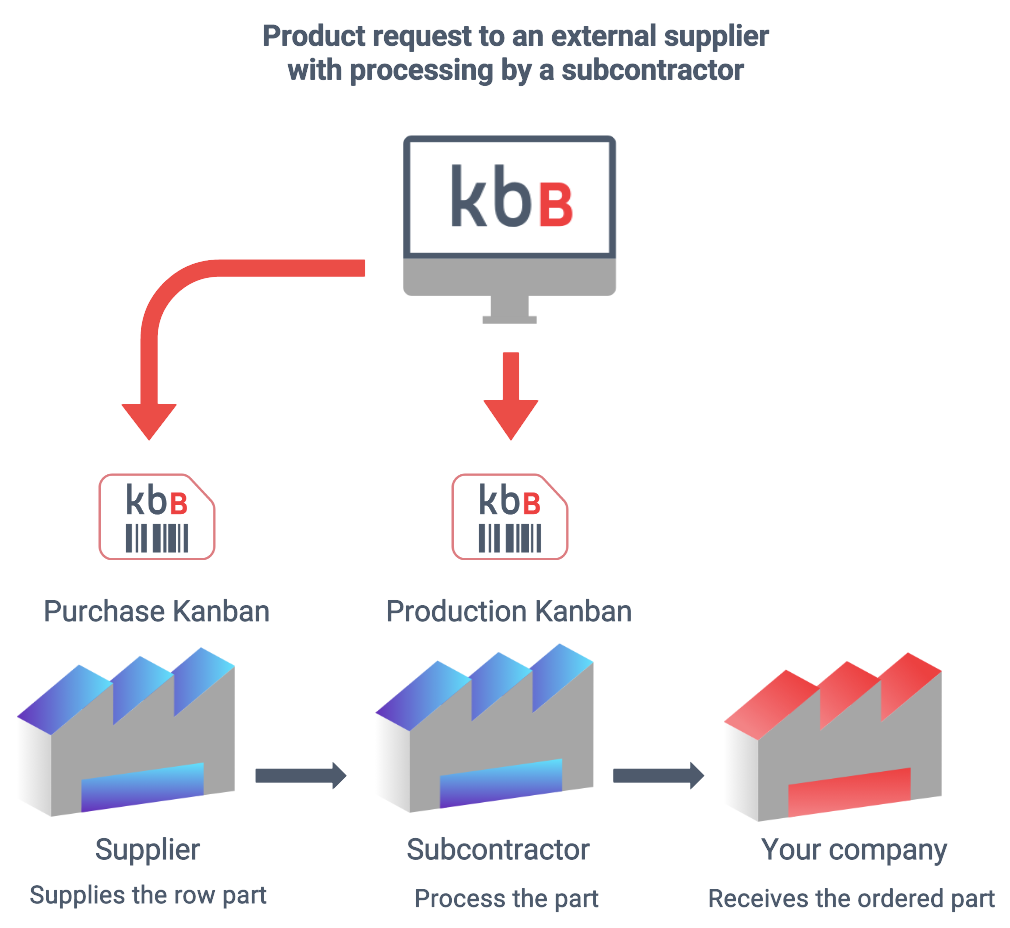
Let’s imagine a company that must manufacture a finished product (a heat pump) and relies on an external supplier for certain components that must then be processed by a subcontractor.
In a traditional scenario, coordinating the company, the supplier, and the subcontractor requires phone calls, emails, follow-ups, and Excel spreadsheets that are hard to keep up to date.
With KanbanBOX multiprocess, the entire flow becomes transparent and synchronized.
When the finished product request arrives, the software automatically generates:
- A purchase kanban addressed to the supplier for the raw component
- A production kanban for the subcontractor, activated only when the raw component supplied by the supplier becomes available
- Any required move kanban
This way, the company has full visibility into component status, the subcontractor receives clear signals about what to work on and when, and the flow between supplier, subcontractor, and company operates as a single pull process, without waste or manual coordination activities.
A truly Lean company does not simply activate production “only when needed,” but does so in the exact order in which it is needed, following a sequence of priorities or operations that would be nearly impossible to coordinate efficiently without dedicated tools.
The multiprocess functionality of KanbanBOX, combined with the Sequencer module, makes this possible by ensuring that each phase is activated only at the right time and in the correct sequence, keeping the flow perfectly aligned with downstream needs.
Let’s explain this with an example.
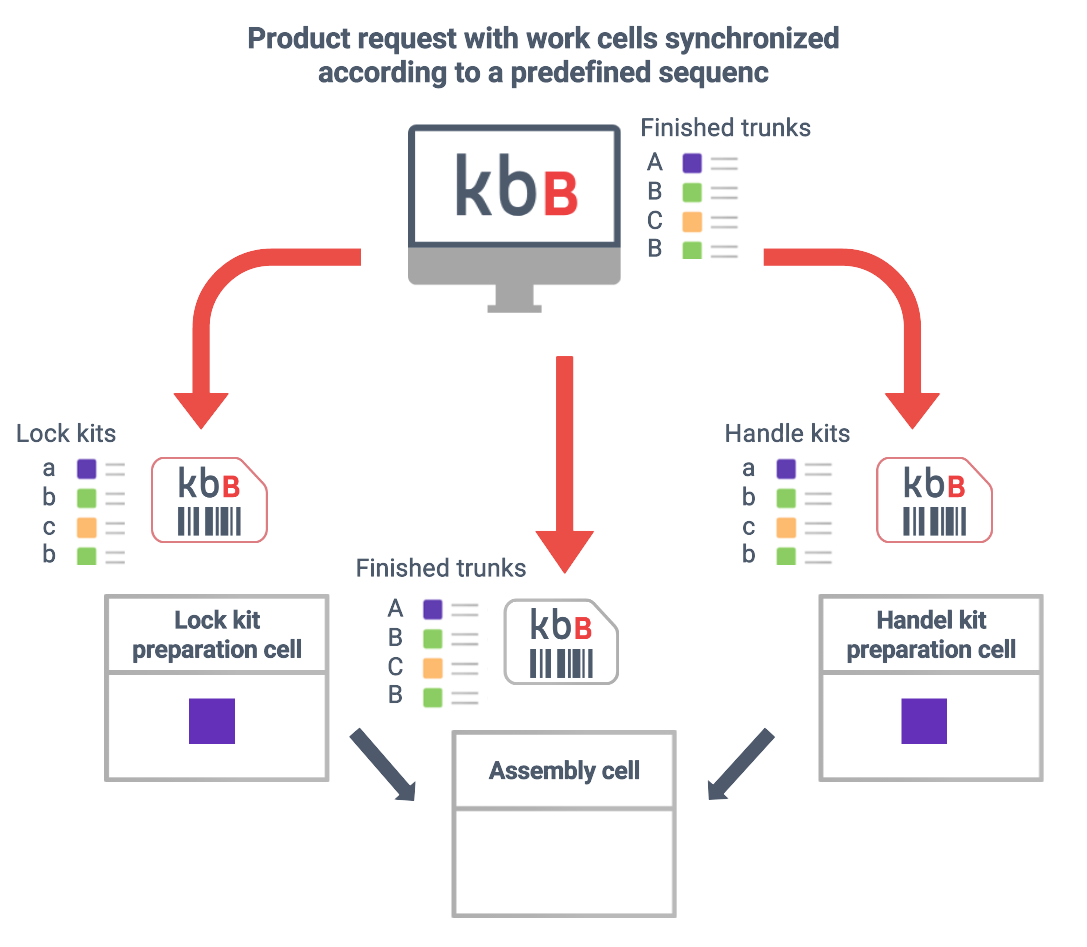
Imagine a company producing trunks in different models (A, B, C, D), all assembled in the same work cell (Assembly). Each model requires two specific component kits: one lock kit (a, b, c, d) and one handle kit (a, b, c, d). Each kit is prepared in a dedicated cell (Lock Kit Preparation and Handle Kit Preparation).
In a synchronized work cell system, when the Assembly cell receives an order to produce models in a specific sequence (A, C, B, D), KanbanBOX automatically generates the cards for preparing both kits so they are worked in the same sequence (a, c, b, d).
This way, the Assembly cell receives exactly the right kits at the right time: not too early (avoiding accumulation and confusion), not too late (avoiding delays), but precisely when needed to assemble each specific model.
Key highlights: automation, transparency, and digital information linking
Among the main strengths of multiprocess kanban are automation, process transparency, and digital information linking.
Automation
When a multiprocess relationship is created between two or more cards, an automation is effectively set up that eliminates the need to manually plan intermediate phases. In practice, the flow itself activates each phase at the right time, based on the actual availability of materials and the progress of upstream operations, without manual planning or continuous adjustments by the production manager.
This automation allows synchronization of departments even when they are physically distant, preventing early starts, misalignments, and fragmented communication. Moreover, since each operation starts only when the part is truly available, the system avoids the creation of intermediate inventories (supermarkets) and keeps the flow lean, continuous, and fully pulled by real demand.
Transparency
Multiprocess kanban provides maximum transparency into process status, because every phase (production or logistics) is represented by a digital card that clearly shows progress, timing, and potential issues.
This allows the entire flow to be monitored, card by card, always knowing which operations are in progress, which are completed, and which are still waiting for part availability. The result is immediate and complete visibility, eliminating uncertainty and enabling timely intervention in case of delays or bottlenecks.
Digital information linking
Digital information linking is particularly valuable not only for inheriting card fields (e.g. additional notes, production order, customer order number, reference to the downstream card that triggered the entire flow), but also for managing exceptions.
If one phase is delayed, KanbanBOX automatically updates the lead time of subsequent phases and highlights which operation is generating the bottleneck and to what extent, enabling fast and targeted corrective actions.
Why multiprocess is one of the most appreciated KanbanBOX features
Multiprocess kanban is one of the most appreciated KanbanBOX features, regardless of industry or company size.
This is because multiprocess kanban has the ability to transform a complex flow into a system that is:
- Responsive, activating each phase only when needed, based on real consumption
- Controlled, thanks to digital boards that provide constant visibility into order status
- Lean, eliminating intermediate inventory and manual planning
- Synchronized, with departments, suppliers, and subcontractors perfectly aligned
- Scalable, applicable from small manufacturing companies to global supply chains
As you can see, for many companies multiprocess is not just a feature, it is a way to transform the entire production and commercial system into a pulled, integrated, and waste-free flow.
From multi-stage production to sequential pull, the software enables companies to synchronize people, departments, and materials with a level of precision and reliability that is impossible to achieve with manual methods or upfront planning.
Do you have a complex production flow and want to see if multiprocess can simplify your work?
Contact us, our experts will help you find out