Electronic Labels for Kanban Systems: Features and Benefits
One of the advantages of electronic kanban over traditional kanban is that it makes it possible to turn the system fully paperless. In practice, this means replacing paper kanban cards with digital devices called electronic labels.
Adopting this solution not only eliminates the paper-based management of kanban cards, including printing, reprinting, replacement, and disposal, but also brings significant benefits in terms of operational efficiency. Let’s see how.
What Are Electronic Labels Used in Kanban Systems?
Electronic labels for kanban systems are small digital screens applied to containers in place of traditional paper kanban cards.
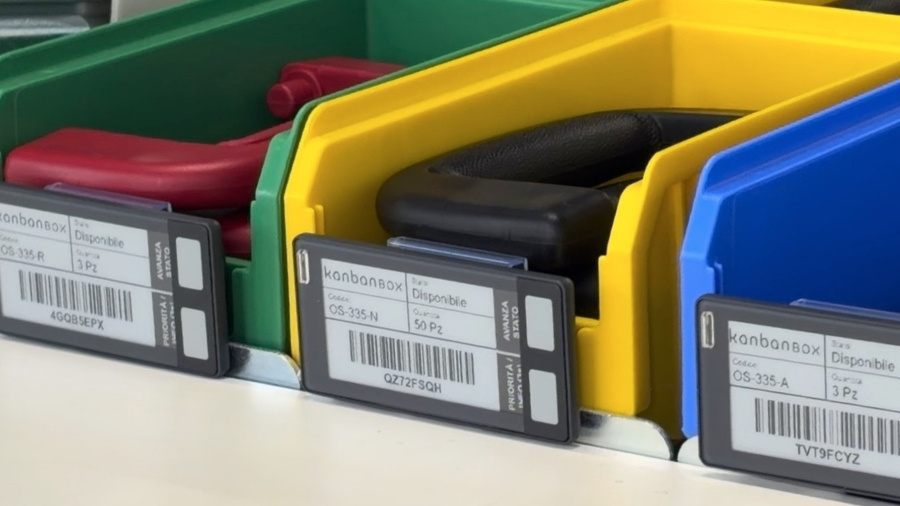
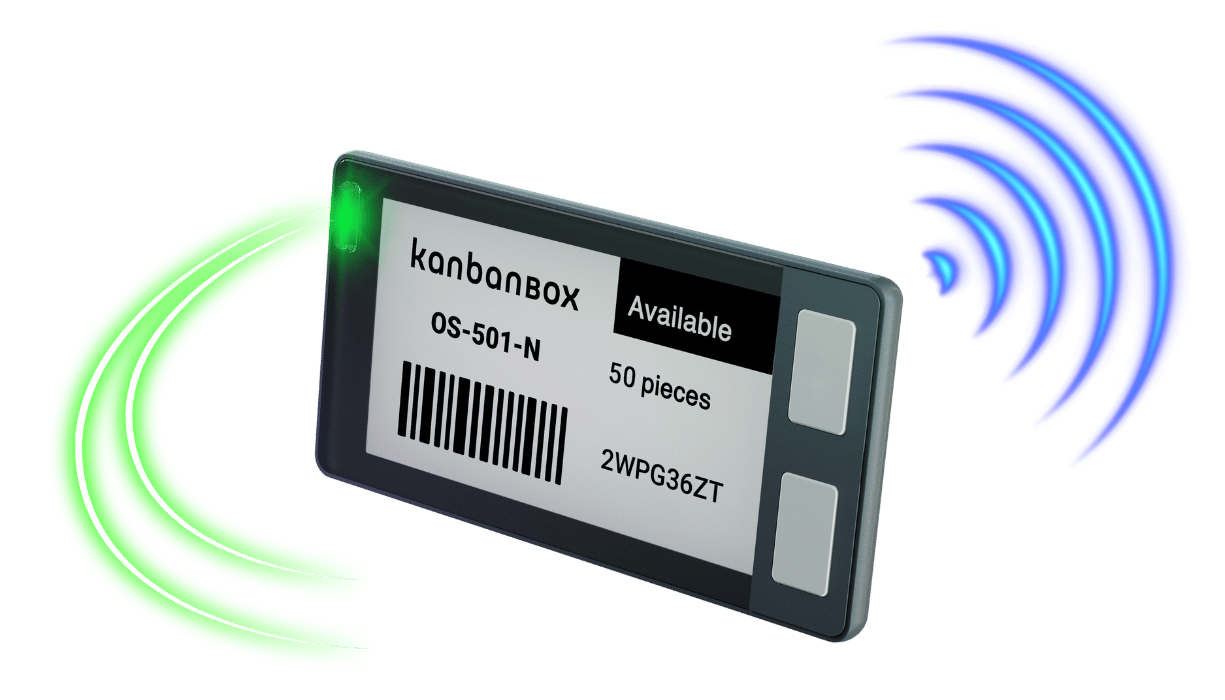
- They are compact devices, with dimensions that vary depending on the model. The device shown in the photo, for example, measures 8 x 4 x 1.3 cm.
- They are wirelessly connected to the electronic kanban software and are applied to kanban containers using clips or dedicated supports.
- They use e-paper technology, the same technology used in e-readers. Unlike computer and smartphone screens, e-papers displays are not backlit. This ensures excellent readability even in very bright environments, without annoying glare.
- They consume very little energy. Electronic labels only use power when the content shown on the display is updated; the rest of the time, they keep the image visible without requiring continuous power. For this reason, battery life is very long and depends mainly on how often the label is updated. With a standard replaceable coin cell battery, battery life can generally range from one year to several years of use.
The Role of Electronic Labels in Kanban Systems
Electronic labels fit into kanban systems by replacing the paper card as the information support applied to the container.
On the display, they show the standard kanban card data, such as item code, component description, quantity per container, location, and other operating information.
Compared with a paper card, however, they have one key difference: they are not static. The label is connected to the electronic kanban software, from which it can receive remote updates. As a result, when parameters such as quantity, location, or others change, the label can be updated remotely without having to reprint and physically replace the card.
Additional features such as buttons, LED lights, and integration options with other systems further expand the role of the electronic label compared with a traditional paper kanban card.
How an Electronic Label Is Associated with a Digital Kanban Card
To work correctly, each electronic label must be associated with the digital kanban card whose data it will display.
The association process is simple:
- When the label is “empty,” meaning it is not yet associated with any card, an operator simply scans the unique barcode shown on the label using a scanner connected to the software. This links the label to the correct kanban card in the software.
- Once the association is complete, the software sends the information to the label wirelessly.
- Within a few seconds, the display updates and shows the data of the associated kanban card.
At the end of the replenishment cycle, when the material has been depleted and the related card has also been marked as “consumed”, the electronic label becomes empty again and is ready to be associated with a new kanban card.
Features of Electronic Labels
Remote and Real-Time Information Updates
As mentioned above, one of the main advantages of electronic labels for kanban systems is the real-time updating of information.
With a paper card, every change that needs to appear on the card requires manual intervention. If a quantity, location, supplier, or management parameter changes, the operator must:
- Reprint the card
- Physically go to the warehouse or production line where the container with the paper card is located
- Identify the specific card among the various containers holding the same material, which can only be distinguished by the alphanumeric code on the kanban card
- Remove the old card and dispose of it
- Apply the new kanban card to the container
This can lead to wasted time, errors, or misalignment between what is physically shown on the card and what is recorded in the system.
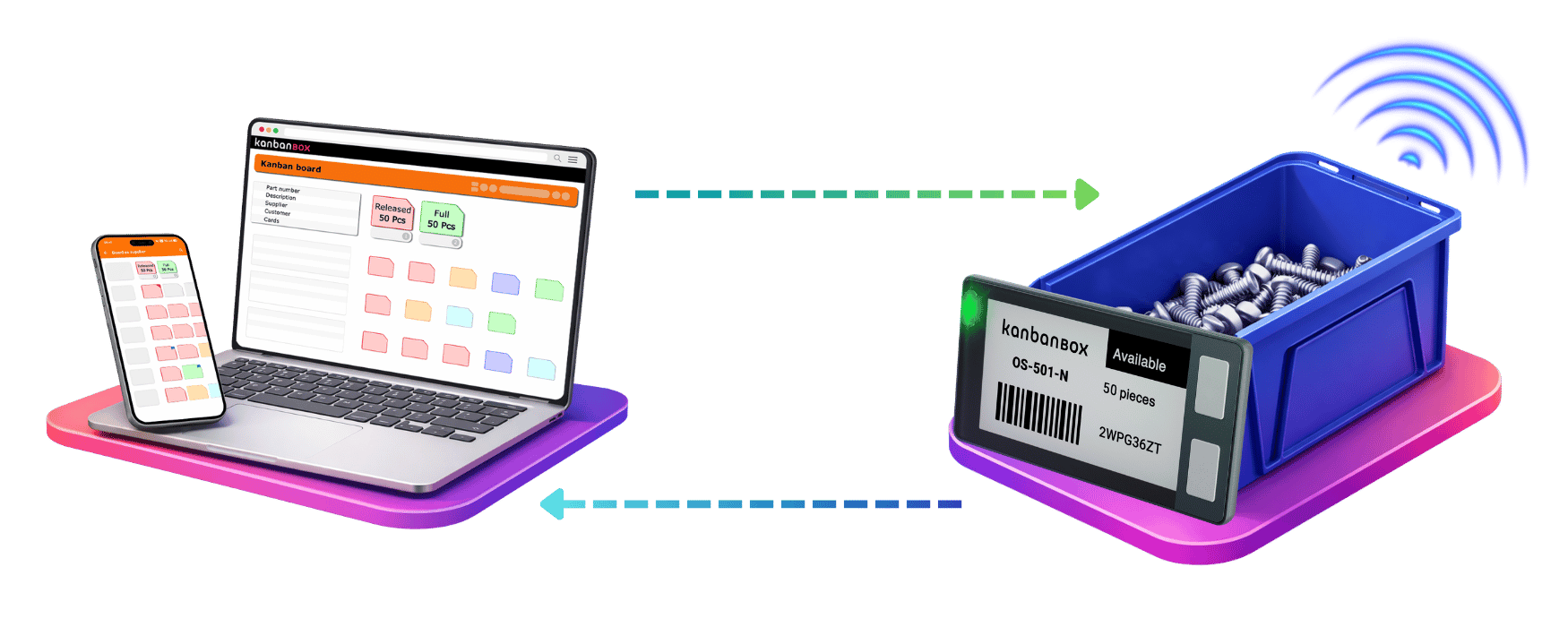
With electronic labels, on the other hand, the information is changed directly from the electronic kanban software interface and transmitted wirelessly to the specific electronic label, which then updates the data shown on the display. This keeps the data visible at the point of use always aligned with the data in the system.
More Information at the Point of Use
Electronic labels for kanban systems make it possible to expand the amount of information available at the point of use. The display can be configured with multiple “pages” that operators can scroll through, making additional data available without overcrowding the main screen.
Buttons for Custom Actions, Such as Status Changes and Priority Signals
Some electronic label models do more than show information on the display. They also include configurable physical buttons. These buttons can be associated with specific actions in the electronic kanban software.
The most common use is changing the status of the card: when an operator depletes a container, they can press the button on the label to signal that the material has been depleted and needs to be replenished. This makes day-to-day management easier for operators because the kanban signal can be activated directly from the container, without the need to carry barcode scanners or other reading devices, through a simple action that is easy to integrate into line activities.
The buttons can also be configured for other actions, such as reporting an urgent need, indicating a priority, or communicating a specific condition directly from the point of use.
LED Lights for Operational Signals, Such as Picking Guidance
Many electronic labels for kanban systems also include a light indicator that can flash in one or more colors. This feature adds another layer of visual communication directly where the work takes place.
LED lights can be used, for example, to indicate to the operator which container to pick material from, to signal an urgent replenishment, or to highlight anomalies and specific operating conditions.
In a production or logistics environment, this functionality can make material identification more immediate and reduce the risk of errors during material picking, movement, or replenishment. The information is therefore not only shown on the display but also made visible through a light signal.
Integration with Industry 4.0 Technologies
Electronic labels for kanban systems can also be integrated with other technologies used in material management and logistics flows, such as RFID (Radio-Frequency-IDentification) systems , RTLS (Real-Time Locating System) or Pick-to-Light.
These integrations allow electronic labels to become part of a broader system for traceability, localization, and operational support.
Guiding the Operator to the Shelf
Thanks to integration with the systems mentioned above, electronic labels for kanban systems can also support operators in physically locating materials.
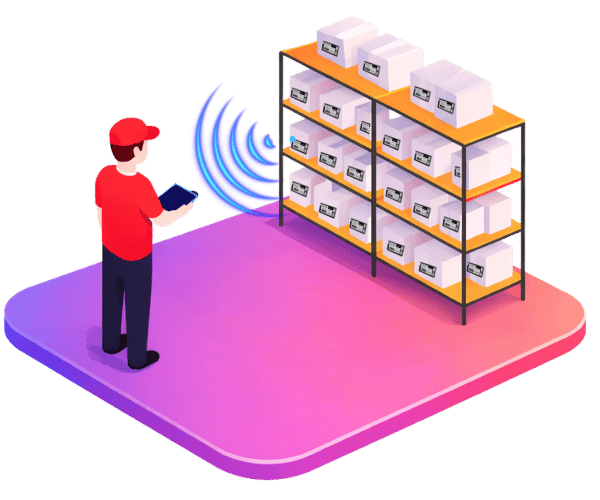
For example, an operator can view the approximate distance to a specific electronic label on a smartphone or other device. As they get closer, the indicated distance decreases, guiding them toward the correct area of the warehouse. Once the operator reaches the area, the LED light on the label can turn on to precisely indicate the container to be picked or replenished.
Automating Status Changes Based on Location
Using electronic labels across multiple sites also opens the door to automating kanban card status changes. For example, in a move kanban between a remote warehouse and a central warehouse, the system can automatically detect when the label moves from one area to another. When the label is no longer detected in the remote warehouse but is detected in the central warehouse, the system can automatically update the status of the card, both in the electronic kanban software and on the label itself.
In this way, the status change no longer depends on a manual action by the operator, but is triggered by the physical movement of the container along the logistics flow.
Automating Status Changes Based on Detected Weight
Electronic labels can also be connected to smart devices, such as scales equipped with BLE (Bluetooth Low Energy) technology placed under kanban containers. In this case, the system can automatically monitor the weight of the container and detect when the material falls below a certain threshold.
If, for example, the weight indicates that the container is empty, the kanban card can automatically change status and move to “depleted,” both in the software and on the electronic label. In this way, the replenishment signal no longer depends on a scan or a manual action by the operator, but is automatically generated based on the actual consumption of the material.
When It Makes Sense to Adopt Electronic Labels in Kanban
Electronic labels do not necessarily have to be applied to every item managed through kanban. In many cases, it can be useful to adopt a gradual or hybrid approach, using them only where they generate the most value.
For example, they can be especially useful in:
- Contexts where the goal is to eliminate paper and the management of paper kanban cards
- High-rotation items
- Critical materials
- Components with frequent changes in quantity, location, or priority
- Production areas where maximum operational efficiency is required and where every action that could distract the operator should be minimized, replacing manual scans with the simple press of a button on the label or automations
- Processes where LED lights can support operators’ work
- Systems that require integration with localization systems and/or Pick-to-Light
For more stable, less frequently moved, or less critical items, companies can continue using paper cards with barcodes or QR codes.
In this way, companies can digitize kanban cards with electronic labels in a targeted way, focusing the technology where it delivers the greatest benefits.
With Electronic Labels, Kanban Becomes Even More Digital
Electronic labels eliminate paper-related activities, keep information aligned with the software, simplify operator interaction with the system, and open the door to new integration opportunities with traceability and operational support technologies.
The result is a kanban system that is more responsive, more organized, and easier to keep updated: more digital in the way information is managed, while still remaining simple, visual, and close to the point where the work actually happens.
For more Information about Electronic Labels, Contact Us!
Our experts are ready to answer your questions and support you in designing specific applications
Case studies
Sacchi | Electrical Supply Distribution
Sacchi uses KanbanBOX to offer its customers a kanban-based sales service, ideal for recurring supplies and supports long-term customer loyalty
Oleodinamica Marchesini | Hydraulic valves
Oleodinamica Marchesini has optimized its production flow management by implementing multi-process kanban and pull production
Robopac | Packaging machines
With KanbanBOX, Robopac achieved a more integrated, responsive, and digitalized supply chain thanks to the integration with both external suppliers and SAP
BCS | Agricultural Mechanization
BCS moved from push to pull through E-kanban for suppliers, production, and internal flows. They now manage 6000 kanban loops across 3 plants
El.Co. | Industrial Electrical Automation
El.Co. has simplified the maintenance of kanbans with e-kanban, which was previously so onerous that the number of parts managed by kanban had to be limited
Orotig | Welding Industry
Orotig has implemented sequential pull in the company, optimizing multi-process production scheduling and supplier integration with KanbanBOX
Rossi SpA | Gearmotors and Electric Motors
Rossi Spa has digitalized the existing production and move kanban, then integrated it with its own ERP, with Oracle Sequencer and with suppliers
Aptiv | High-tech automotive systems
From the introduction of kanban to the transition to e-kanban. The Lean Improvement journey of the largest manufacturer of electronic interconnection systems for the automotive sector
References