Printing kanban cards
Discover customizable, ready-to-use kanban card templates for material management
Do you need to print kanban cards to better organize materials, production, or warehouse operations?
Whether you’re starting from scratch or improving an existing system, having clear, standardized, and easily updatable kanban cards is essential to make your kanban system truly effective.
With KanbanBOX, you can create, customize, and print kanban cards in just a few clicks, avoiding scattered Excel files, manual errors, and outdated information.
Start with customizable templates
Choose from ready-to-use templates and adapt them to your operational needs to ensure clear and standardized kanban cards
Use automatic kanban sizing
Thanks to automatic calculation of the right kanban sizing, you can make the sizing process faster and more effective
Add images and technical drawings
To speed up and simplify component identification, you can add photos or technical drawings directly to the kanban card
Create, print, and manage in just a few clicks
With KanbanBOX and its intuitive interface, creating, printing, and managing kanban cards becomes a simple, fast, and standardized activity.
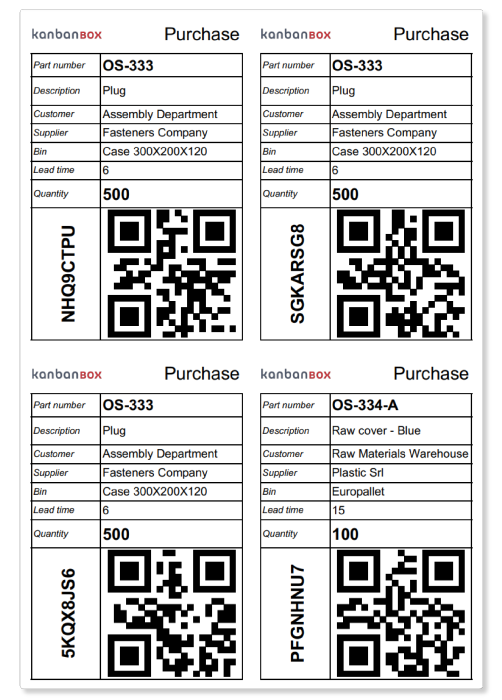
- Start from customizable templates and select the information to display
- Add visual elements such as company logo, QR codes, datamatrix, barcodes, component images, or colors to distinguish departments and flows
- Choose the print format, including multiple cards per page or double-sided printing
- Print in just a few clicks using a standard printer or dedicated printers with pre-cut labels
You can also create as many templates as needed, differentiating them by use: production, purchasing, sales, or material handling.
Automatic kanban sizing calculation
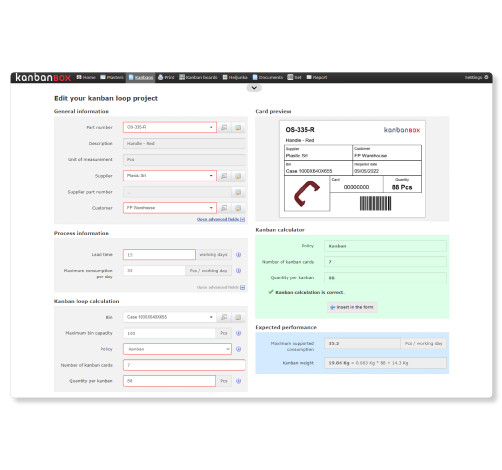
One of the most impactful mistakes is printing kanban cards without proper loop sizing.
KanbanBOX automatically calculates the optimal number of cards by analyzing key process data (easily uploaded into the platform), such as maximum daily consumption, supplier lead time, safety lead time, and standard container quantity.
The software suggests a reliable and consistent sizing, which you can adjust based on your experience and operational constraints, such as limited space.
More than printing: manage your kanban flow efficiently
If your goal is simply to print kanban cards, you can start right away with templates.
But if you want to truly optimize material management, production, and purchasing, KanbanBOX allows you to go beyond printing and build a complete, reliable, and scalable kanban system.
- Simplify kanban maintenance by eliminating the need to reprint cards when loop quantities change
- Track all data with real-time visibility on stock levels, consumption, and orders
- Reduce inventory levels and the risk of stockouts
- Decrease lead time
- Easily manage multi-process or multi-plant flows
- Integrate suppliers, customers, and subcontractors into your kanban system
Not just printed cards: electronic labels
Today, you can complement or replace paper kanban cards with electronic labels that allow real-time updates.
- Eliminate the need to print and reprint paper kanban cards
- Send replenishment signals directly from the electronic label with a simple button press
- Further reduce errors and manual activities
- Increase speed and traceability, especially in dynamic or high-variability environments
A natural evolution of kanban to make your system even simpler, more reliable, and more effective. Learn more about electronic labels.

How to simplify kanban maintenance
Optimize kanban maintenance and sizing by focusing on two key aspects: automatic sizing calculation and simplified kanban card management.
Learn moreHow El.Co. simplified kanban management
El.Co., a manufacturer of electrical components, streamlined kanban maintenance, previously so complex that it limited the number of items managed with kanban.
Read the case studyHow Oleodinamica Marchesini reduced inventory
Oleodinamica Marchesini, specialized in hydraulic valves, reduced inventory for its highest-rotation item, managed via kanban, from 200 boxes down to just 14 boxes.
Discover howDiscover all printing options
Print your first kanban card in less than three minutes
Case studies
Sacchi | Electrical Supply Distribution
Sacchi uses KanbanBOX to offer its customers a kanban-based sales service, ideal for recurring supplies and supports long-term customer loyalty
Oleodinamica Marchesini | Hydraulic valves
Oleodinamica Marchesini has optimized its production flow management by implementing multi-process kanban and pull production
Robopac | Packaging machines
With KanbanBOX, Robopac achieved a more integrated, responsive, and digitalized supply chain thanks to the integration with both external suppliers and SAP
BCS | Agricultural Mechanization
BCS moved from push to pull through E-kanban for suppliers, production, and internal flows. They now manage 6000 kanban loops across 3 plants
El.Co. | Industrial Electrical Automation
El.Co. has simplified the maintenance of kanbans with e-kanban, which was previously so onerous that the number of parts managed by kanban had to be limited
Orotig | Welding Industry
Orotig has implemented sequential pull in the company, optimizing multi-process production scheduling and supplier integration with KanbanBOX
Rossi SpA | Gearmotors and Electric Motors
Rossi Spa has digitalized the existing production and move kanban, then integrated it with its own ERP, with Oracle Sequencer and with suppliers
Aptiv | High-tech automotive systems
From the introduction of kanban to the transition to e-kanban. The Lean Improvement journey of the largest manufacturer of electronic interconnection systems for the automotive sector
References