KanbanBOX for Real-Time Process Visibility
One of the most appreciated benefits of KanbanBOX is complete, real-time visibility into the status of processes and materials, both inside and outside the production plant, including suppliers and subcontractors. This visibility is made possible by the kanban board.
But what exactly is the KanbanBOX kanban board, and how does it concretely increase real-time visibility over processes and materials?
Let’s find out.
Kanban board and digital kanban cards: what they are
In KanbanBOX, the kanban board is a core section of the software, designed to display in real time all the kanban cards managed by the electronic kanban system.
In electronic kanban systems, every physical kanban card has a digital version that can be consulted in the software, specifically on the kanban board.
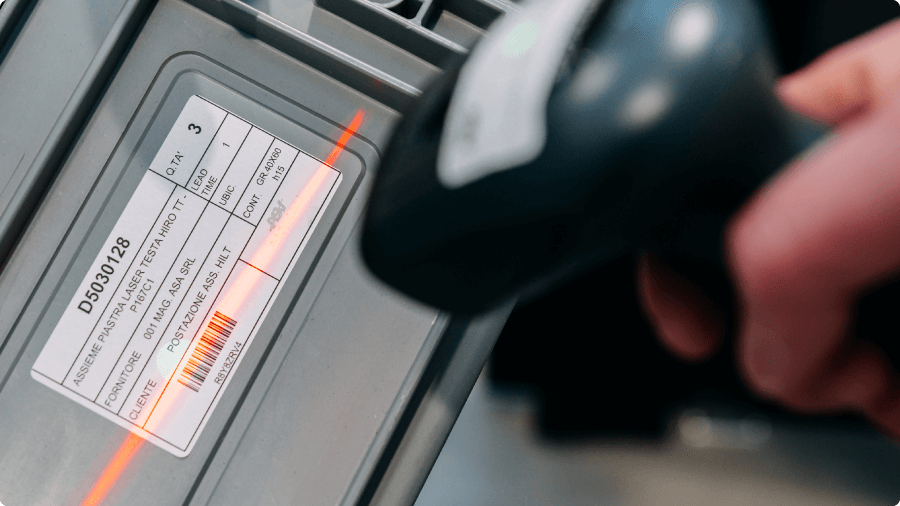
The one-to-one correspondence between the physical kanban card and the digital kanban card is ensured by a unique identification code, visible on both versions. This means that even two kanban containers supplied by the same supplier to the same customer for the same component (and, technically speaking, belonging to the same kanban loop) will always have different ID codes.
The identification code is shown in alphanumeric format on both physical and digital kanban card, with the addition of the barcode version on the physical card. This makes it easy to scan using handheld devices, barcode scanners, or other mobile devices.
At-a-glance visibility of the e-kanban system status
The KanbanBOX kanban board is primarily designed to visually and quickly convey to users the key information needed to understand the current status of their electronic kanban (e-kanban) system.
Each kanban card displays different visual elements depending on:
- Kanban card status (full, to be replenished, in process, in transit, batching…)
- Kanban card type (linked to a closed order or a kanban order)
- Delays, urgencies, or critical issues
- Comments or ongoing negotiations, which can be added and viewed by simply clicking on the kanban card
- Dependencies (e.g. a multi-process kanban card can only be worked once the previous stage has been completed)
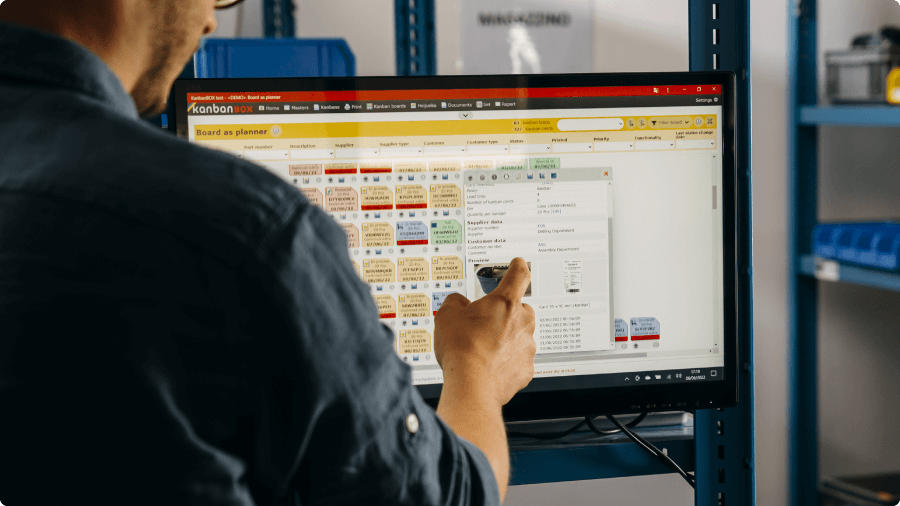
On the digital board, kanban cards can be filtered by multiple parameters, such as card status, supplier, customer, item, and more.
This allows each user, when accessing a board filtered to their area of responsibility, to immediately understand which cards need to be worked on, which require attention, and the overall status of materials and processes.
By clicking on an individual kanban card, users can also access additional details, including the full history of status changes.
Real-time visibility into kanban card status updates
In KanbanBOX, kanban cards’ status can be updated mainly in two ways:
- For users working at a computer, by clicking the status change icon directly on the kanban card in the kanban board
- For operators working on the shop floor, by scanning the barcode on the physical kanban card attached to the container whose status needs to be updated.
Barcode scanning can be done using any barcode scanning device, such as handheld terminals or scanner guns, or via a smartphone camera after installing the KanbanBOX mobile app.
Let’s take a closer look at how barcode-based status updates work, using a practical example.
Status update via barcode scanning: step-by-step process
Let’s imagine a warehouse operator (Alex) accessing the digital kanban board filtered to show the kanban cards for which he is the supplier.
The first thing he notices is a red kanban card that needs to be replenished. By clicking on the card, Alex can access all the information required to perform the replenishment:
- Component name and code: connector model E15Z
- Kanban card ID: BW2RB92J
- Container: medium-sized plastic bin
- Quantity to load: 20 pieces
- Customer process and delivery location: supermarket line A5
Based on this information, Alex carries out the replenishment as follows:
- He prepares the material to be replenished
- He prints the corresponding kanban card (ID BW2RB92J) by clicking the print icon at the bottom of the digital card on the board
- He attaches the printed kanban card to the outside of the container
- He delivers the container to the customer process (supermarket line A5) and places it in the designated supermarket
- He scans the barcode on the kanban card attached to the container
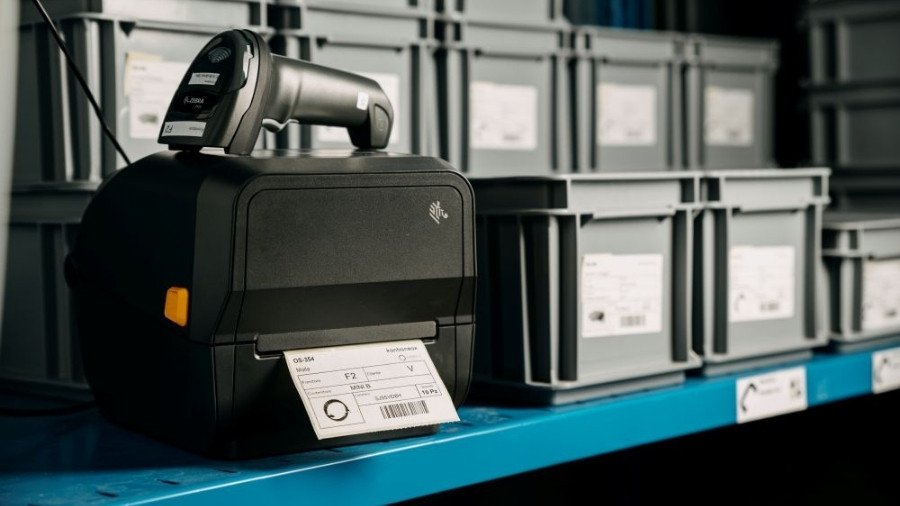
The scan immediately communicates the status change of kanban card BW2RB92J to the software. As a result, on the digital kanban board the related kanban card no longer appears in red as “To be replenished,” but in green as “Full.”
It’s important to note that this status change is not only visible to Alex, but to anyone accessing the kanban board, allowing all operators to work with always up-to-date information.
Visibility into production orders and their progress
The kanban board provides clear and immediate visibility not only into material status, but also into production orders and their progress.
For production orders, operators know which components to produce or process based on the kanban cards displayed on the kanban board, filtered for their workstation and marked as “To be replenished.”
The order in which kanban cards are processed can follow simple criteria, such as due dates for production or replenishment, or more advanced priority rules. In these cases, the Sequencer comes into play. It allows the production manager not only to clearly visualize the production schedule, but also to manage and adjust, within a few clicks, the assignment and processing sequence for each machine or work cell.
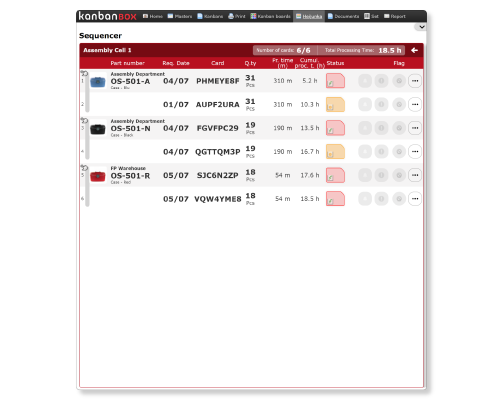
An additional level of visibility concerns multi-stage processes: the kanban board makes dependencies between stages immediately visible, highlighting any bottlenecks at specific operations and their consequences, such as delays and changes in overall lead time.
This level of transparency makes it possible to keep critical processes under control and intervene promptly when needed.
“In managing our very complex production flows, I struggled to understand whether lead time was being met or not. KanbanBOX allowed us to break the kanban flow into multiple processes, so we could monitor them in greater detail, with disarming ease.”
Davide Cavazza, Logistic Manager at Mec-Track
Shared visibility with suppliers, customers, and subcontractors
Let’s explain this with an example, using a hypothetical company, Suitcase co., a carry-on Suitcase manufacturer, and its supplier of plastic wheels, Wheels co.
Suitcase co. decides to adopt KanbanBOX to manage orders with all its suppliers, including Wheels co., both for recurring kanban-managed materials and for closed orders.
Convincing the supplier to adopt the software was not difficult: a short demo was enough to show how easy it is to use. In addition, the software does not require complex configurations (because it is a web-based solution), and the license for connected suppliers is completely free.
Once the free license is activated, Wheels co. can access a dedicated version of the kanban board that displays only the components it supplies to Suitcase co.
The replenishment process is similar to that of an internal supplier: the supplier’s operator (Frank from Wheels co.) views the materials to be replenished on the digital kanban board, prepares the materials, and prints the kanban card. The only difference is that Frank’s final scan of the kanban card does not change the material’s status as “Full” (since it is still at the supplier’s site and cannot yet be used by the customer), but instead generates the transport document in KanbanBOX, changing the material status to “In transit.”
The material will be marked as “Full” once it is received at Suitcase co.
“By extending KanbanBOX to our supplier network, we clearly noticed a reduction in order management effort, and hidden WIP emerged. WIP that was frustrating both suppliers and internal customers.”.
Salvatore Marzullo, Lean Manufacturing Responsible at Lamiflex
Further reading
In this content, we highlighted the features that allow KanbanBOX users to gain visibility and control over the status of materials and processes, both internal and external.
For further insights, we recommend reading:
- “Sacchi Elettrofornitura” case study, for visibility into customer consumption
- “Robopac” case study, for visibility into supplier and subcontractor order status
- “KanbanBOX Benefits” page, for additional advantages offered by the platform
Do you have any questions?
Case studies
Sacchi | Electrical Supply Distribution
Sacchi uses KanbanBOX to offer its customers a kanban-based sales service, ideal for recurring supplies and supports long-term customer loyalty
Oleodinamica Marchesini | Hydraulic valves
Oleodinamica Marchesini has optimized its production flow management by implementing multi-process kanban and pull production
Robopac | Packaging machines
With KanbanBOX, Robopac achieved a more integrated, responsive, and digitalized supply chain thanks to the integration with both external suppliers and SAP
BCS | Agricultural Mechanization
BCS moved from push to pull through E-kanban for suppliers, production, and internal flows. They now manage 6000 kanban loops across 3 plants
El.Co. | Industrial Electrical Automation
El.Co. has simplified the maintenance of kanbans with e-kanban, which was previously so onerous that the number of parts managed by kanban had to be limited
Orotig | Welding Industry
Orotig has implemented sequential pull in the company, optimizing multi-process production scheduling and supplier integration with KanbanBOX
Rossi SpA | Gearmotors and Electric Motors
Rossi Spa has digitalized the existing production and move kanban, then integrated it with its own ERP, with Oracle Sequencer and with suppliers
Aptiv | High-tech automotive systems
From the introduction of kanban to the transition to e-kanban. The Lean Improvement journey of the largest manufacturer of electronic interconnection systems for the automotive sector
References